Professional email templates for rental businesses can help you respond faster and look more polished—but they don’t solve the real problem.
Quotes go out, follow-ups get missed, and customers slip through the cracks, not because they said no, but because no one followed up at the right time.
In this guide, you’ll get templates you can use immediately, plus a better way to speed up your email process and capture more leads without chasing customers down yourself.
Just want the templates? Jump to the download here!

What Makes a “Professional” Rental Email
A professional email does two things: it makes you look legitimate and makes it easy for the customer to move forward.
At a minimum, every email should have:
- A clear subject line: So the customer knows what it is without opening it.
- A short message: No extra context. Just what they need.
- One next step: Review the quote. Approve it. Pay it.
- Sent at the right time: While the customer is still planning.
The structure matters because customers are making a quick judgment. If your email is messy, vague, or inconsistent, it raises questions. If it’s clear and put together, it builds trust right away.
In short, a strong email builds trust. Sending it at the right time is what gets the order.
But speed still plays a big role. Companies that respond quickly are up to 60 times more successful than those taking 24 hours. Fast replies show you’re organized and paying attention.
If you don’t respond quickly or follow up, customers don’t wait. They move on.
Why Rental Businesses Struggle With Email
Most teams treat emails as a task. Something you get to when you have time. That means that follow-ups often depend on memory and how busy the day is.
That’s why it’s inconsistent. So what seems like an email issue is actually a follow-through issue.
This happens in successful businesses. It’s not that your team is doing anything wrong. It usually just means there isn’t a system in place to support consistent follow-through.

Table of Contents
Three Things You Can Do Right Now to Improve Your Emails
You don’t need to overhaul your process to see improvement. A few small changes can make a big difference right away.
1. Set a follow-up schedule (and stick to it)
Most missed orders come down to a lack of follow-up.
Instead of relying on memory, use a simple default:
- Day 0 (same day): send the quote
- Day 1: quick follow-up
- Day 3: second follow-up
- Day 5–7: final check-in or “closing soon” message
If you don’t have a system to automate this yet, use something simple:
- Add a task when you send a quote (Google Calendar or your task app)
- Keep a basic tracking sheet with: customer name, event date, last contact, next follow-up date
- Block 15–20 minutes each day to run through follow-ups
It doesn’t need to be perfect. It just needs to be consistent.
2. Standardize your core emails
If every email is written from scratch, it will always be inconsistent.
Start with a few key templates:
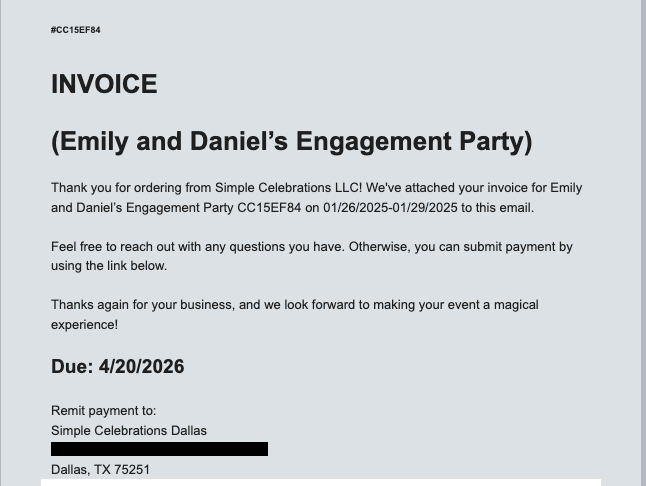
- quote email
- follow-up
- payment reminder
Keep them short and clear. This saves time and makes your business look more organized to customers.
If you’re using rental software, most systems can automate these emails so they go out at the right time with the right information. That removes a lot of the manual work and keeps everything consistent.
If you’re not using software yet, it’s worth looking at your options. We’ve written a few guides to help you compare and prepare for demos!
- Event Rental Software Comparison: TapGoods vs Goodshuffle Pro vs Booqable
- How to Prepare for a Demo of Party Rental Software
- Top Mobile Inventory Tracking Software for Rental Businesses
3. Make the next step obvious
Every email should answer one question: what should the customer do next?
- Review the quote.
- Approve the order.
- Make a payment.
If that next step isn’t clear, the email will likely get ignored.
What to Look for in an Email System
Not all email tools are built for rental workflows. If you’re evaluating options, these are the things that actually matter day-to-day.
Automated sends
Emails should go out based on what’s happening with the order, not based on someone remembering to send them.
That means emails are triggered as the order progresses.
For example:
- Quote is sent → follow-up emails are scheduled automatically
- Customer hasn’t responded → reminders go out at set intervals
- Payment is due → a payment reminder is triggered
- Event is approaching → pre-event emails are sent
- Order is confirmed → confirmation goes out immediately
Each step in the process triggers the next email.
That’s what makes it consistent. The same actions produce the same follow-through every time.
Follow-up sequences
One email isn’t enough.
Most customers won’t respond to the first message, mainly because they’re busy or still deciding.
A follow-up sequence ensures nothing gets dropped after the first email.
Instead of a single message, you have a defined path:
- initial quote
- follow-up
- reminder or expiration
Each step builds on the last and keeps the conversation moving.
Without a sequence, follow-up is inconsistent. Some customers get multiple touchpoints. Others get none.
With a sequence, every customer gets the same level of attention without you and your team having to think about it each time.
Personalization
Your emails should pull directly from your order data so they feel specific without extra work.
That means including details like:
- customer name
- event date
- order details
If emails are generic or lack details, they create friction. Customers have to double-check what the email is about or ask follow-up questions.
When the right information is already there, it’s easier for them to review and move forward.
It also reduces mistakes on your end. This way, you don’t have to copy and paste details or update emails manually every time something changes.
Native to your rental system
Your email system should be connected to the same place you manage orders.
If it’s separate, you’ll spend time copying links, updating details, and fixing errors.
When it’s built into your rental system, everything stays in sync.
The Email Flow That Replaces Chasing Customers
Instead of thinking about individual emails, think in terms of a flow.
Each step in the order process triggers the next message, so nothing gets missed and the customer always knows what to do next.
A simple flow looks like this:
- Lead response: A quick reply that confirms you received the request and sets expectations.
- Quote: Clear, direct, with a link to review and reserve.
- Follow-ups: Scheduled check-ins to keep the order moving.
- Reminders: Timed around the event or decision window so you stay top of mind.
- Expiration: A clear signal that availability or pricing may change.
- Confirmation: Sent immediately once the order is booked.
- Payments: Invoice, reminders, and final balance.
- Pre-event: Delivery details, final check-ins, anything that reduces last-minute questions.
- Post-event: Thank you, review requests, and repeat business.
When this flow is in place, you stop chasing customers. The process does the follow-up for you.

Get Your Free 12 Professional Email Templates
You don’t need to rewrite your emails from scratch.
Our pre-written templates give you a starting point. They cover the core moments in your process, so you’re not left guessing about what to send or when to send it.
If you want to move faster and clean this up quickly, download the full set of 16 email templates and start using them right away.
Download the email template pack below!
Frequently Asked Questions
A professional rental email should be clear, short, and action-oriented. It should include a clear subject line, relevant details (like event date or order info), and one obvious next step such as reviewing a quote or making a payment.
A good follow-up email is short and direct. It should reference the original quote, ask if the customer has questions, and remind them how to move forward. Timing matters—follow up within 24 hours, then again a few days later if needed.
Most rental businesses should send 2–4 follow-ups. Customers often don’t respond to the first email, so a simple sequence over several days increases the chances of booking the order.
Quotes usually go cold due to missed follow-ups, delayed responses, or unclear next steps. Customers may still be interested, but without reminders or urgency, they move on or forget to respond.
You can automate emails using rental software that sends messages based on order activity, such as when a quote is sent, a payment is due, or an event is approaching. This removes the need to manually track and send emails.
At a minimum, rental businesses should send lead responses, quotes, follow-ups, payment reminders, order confirmations, pre-event details, and post-event thank you or review requests.
Use consistent templates, keep messages short, include accurate order details, and make the next step clear. Avoid long explanations or unclear wording.
You can use a simple system like a spreadsheet or calendar reminders. Track each customer, their event date, last contact, and next follow-up date, and review it daily.
Yes, templates improve consistency and speed. However, they work best when paired with a follow-up process, since most bookings happen after multiple touchpoints.
For most rental businesses, TapGoods is the best overall solution because it connects email automation directly to your order flow, covering both operations and sales in one system.
Booqable is a good option for very small teams that need something simple, but it can be limited as operations become more complex.
Goodshuffle Pro is a strong fit for teams that prioritize proposals and the sales side, but it’s not as robust on the operations side.
If you need both strong operations and sales workflows, TapGoods is the most complete solution.
Ideally within the same day, or within a few hours. Faster responses increase the likelihood of booking because customers are often reaching out to multiple vendors.
The biggest mistake is inconsistent follow-up. Even well-written emails won’t convert if they aren’t sent at the right time or repeated when needed.